
PinPoint by Avalanche Creative
Website feedback, pinned to the page

Stop describing the bug. Point at it.

Click anywhere on your live site and leave a comment on the spot. The element, page, screen size, a screenshot and the reviewer's browser details come along automatically. Reviewers don't need an account. You add one line of code. When it's time to fix things, copy the feedback as Markdown and hand it to your AI coding assistant to update the site.

Start free with one site See how it works
No credit card. Pro is $19 a month for 10 sites.
staging.acmelandscaping.com/?pinpoint=acme
Acme Landscaping ServicesProjectsAboutGet a free estimate
Backyards you'll actually use.
Design, build and seasonal care for West Michigan homes. Licensed, insured, and on time.
Schedule a consultation
✓
SC
Sarah ChenOwner · just now
✓ Resolved
Can we make this punchier? Maybe “Backyards you'll actually use.”
#hero h1 Desktop · 1440px / (home)
MT
Mike Torres · DeveloperLove it. Changing it now.
PinPoint 0 open DesktopTabletMobile
Works with WordPress Webflow Squarespace Shopify React Vue Next.js HTML

Feedback by email is a scavenger hunt.

“The blue button. No, the other blue button.”
Reviewers describe what they see. Developers guess what they meant.
“Here's a screenshot.”
Of which page, at what width? A cropped image with no context is a riddle.
“It's broken on my phone.”
Which phone, which element? Usually nobody can reproduce it.
With PinPoint, every comment arrives with its context attached:
Element
#cta
Page
acmelandscaping.com/
Viewport
Mobile · 390px
Current text
"Schedule a consultation"
Styles
17px · 700 · #1a5c3a
Browser
Safari on iOS · 1 console error
Screenshot
auto · cta-mobile.png
Request
Say “Get a free estimate” to match the nav. A touch bigger on mobile.
Your developer opens the comment and already knows what to change.

Three steps. Zero training.

Regular visitors never see a thing. The feedback layer only loads for people who open your private link.
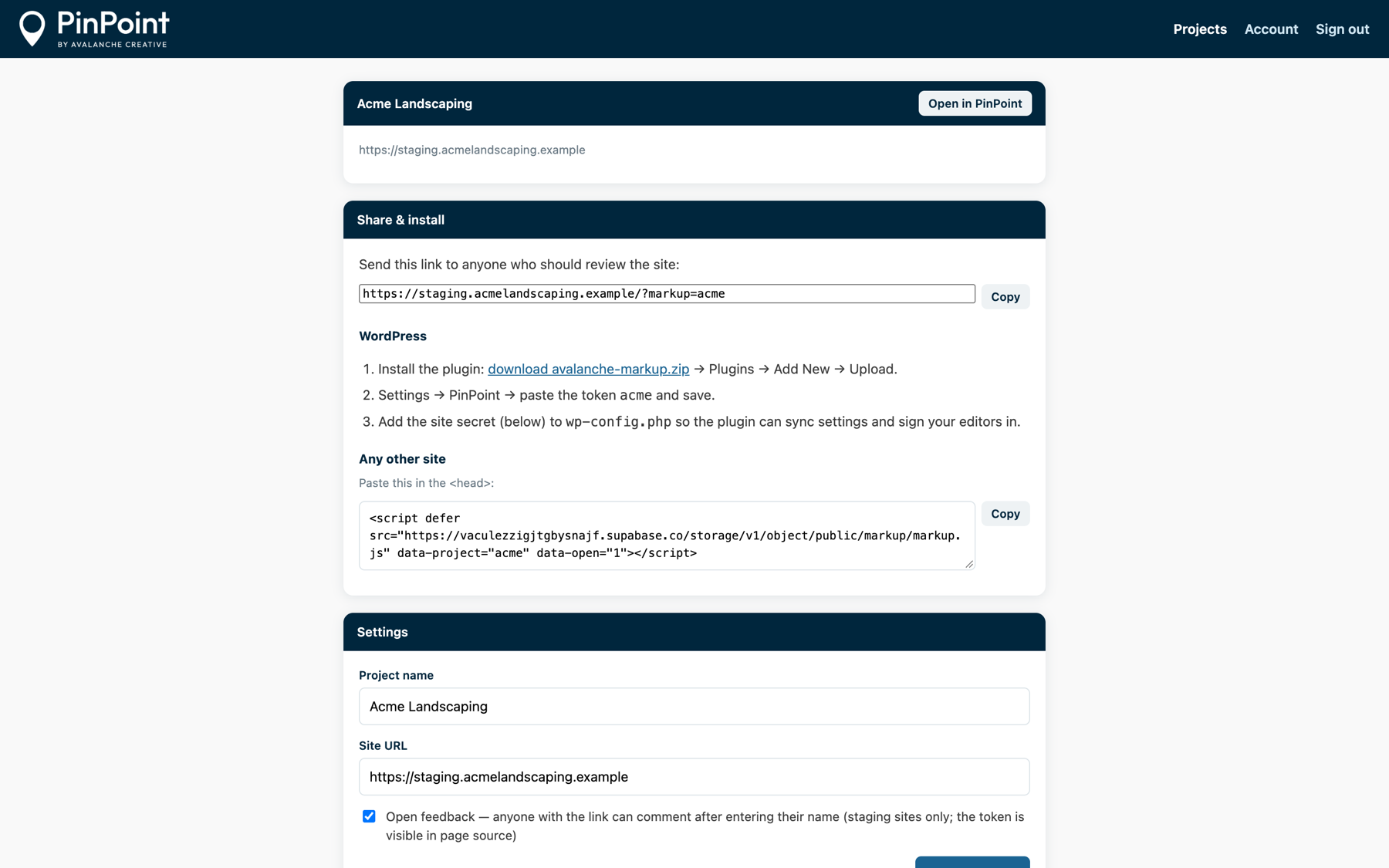
The project page in the PinPoint dashboard: share link, WordPress steps and the one-line embed.
1

Add one line to your site

Install the WordPress plugin, or paste one script tag into any site.

<script defer src="…/markup.js" data-project="acme">
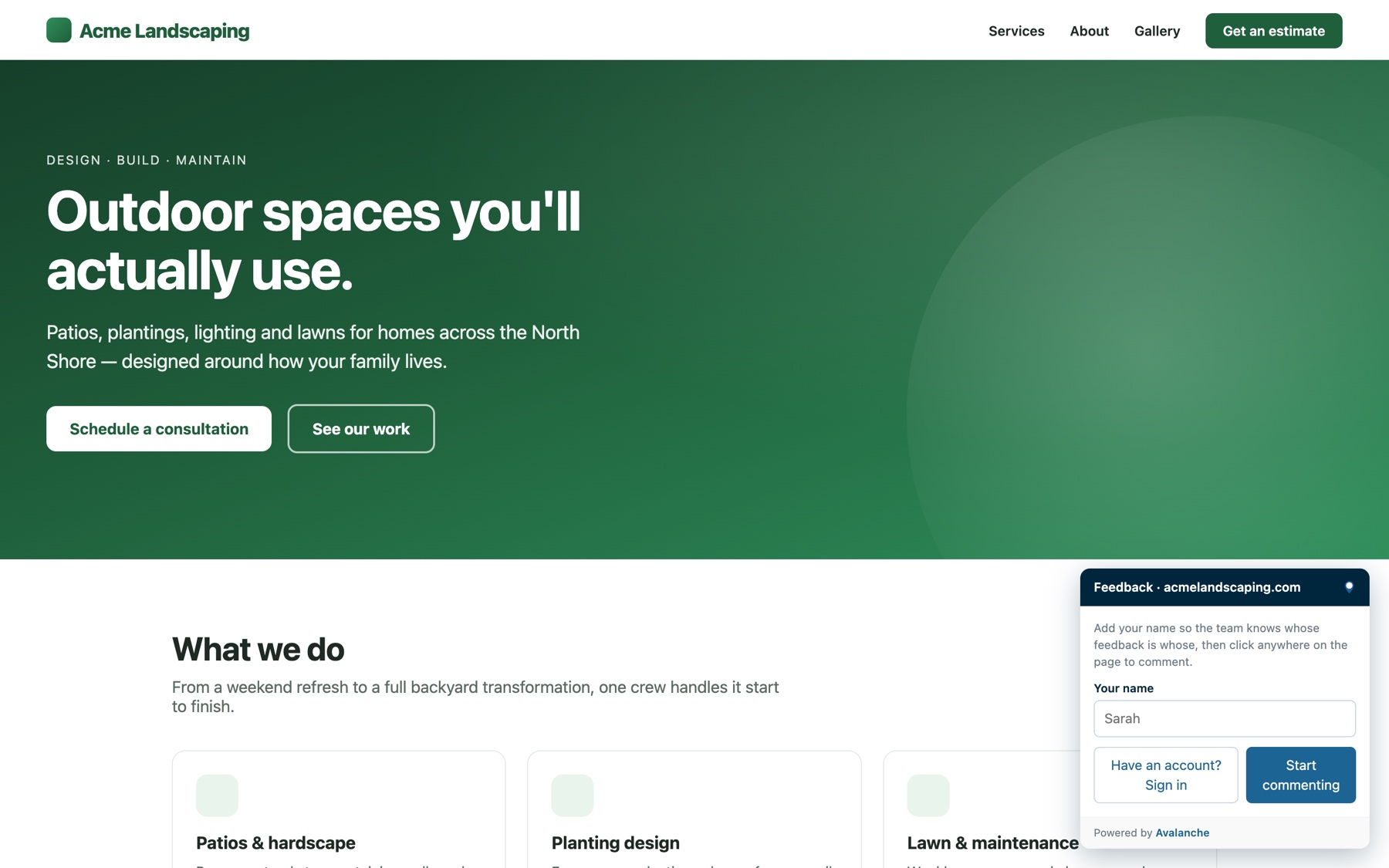
The name-only entry card a reviewer sees before commenting.
2

Share the link

Reviewers type their name and start clicking. No account or password. Want tighter control? Invite specific people instead.
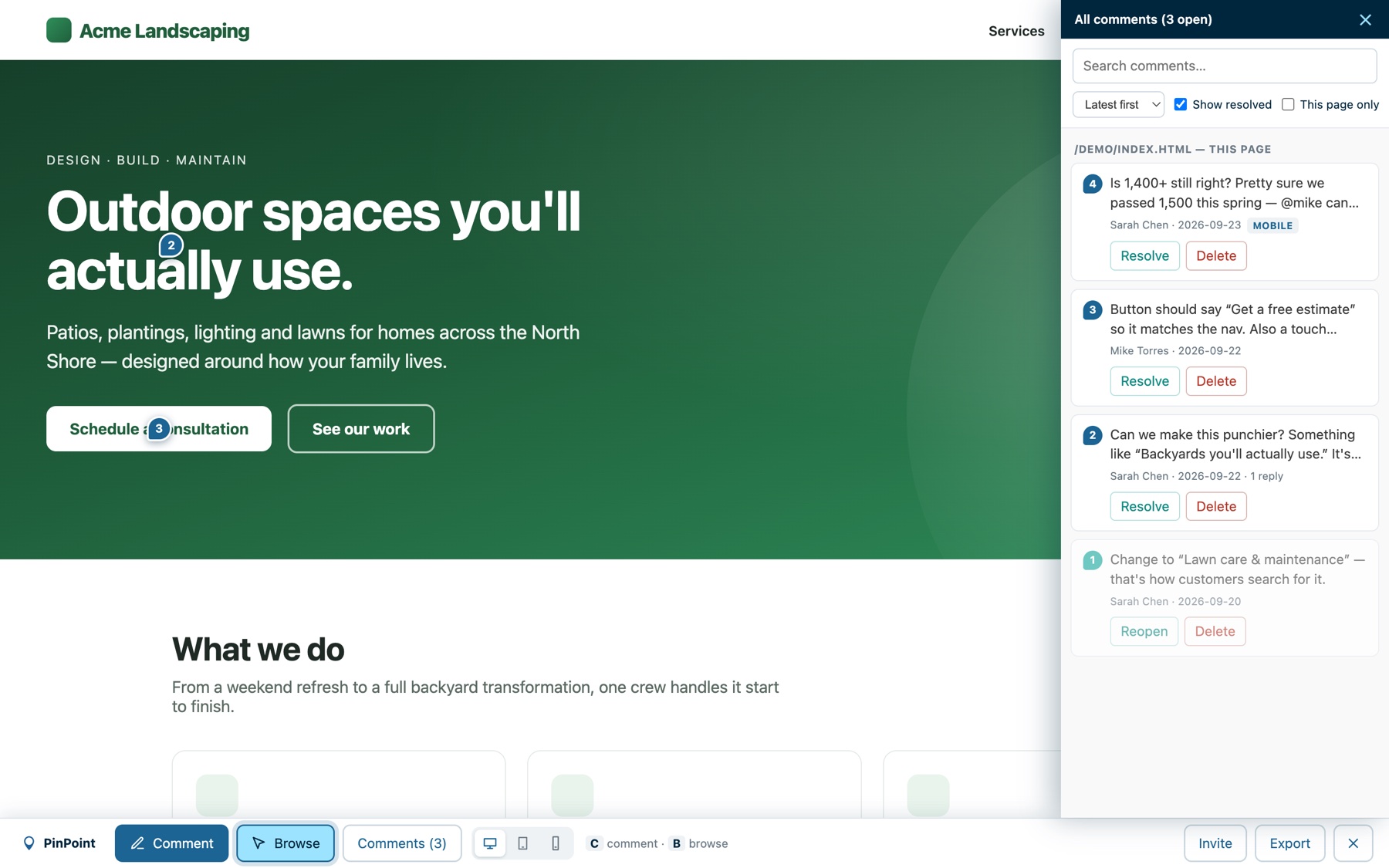
The comments sidebar listing feedback across the site.
3

Fix it with full context

Each pin carries its selector, text, styles, page and viewport. Reply in threads, @mention teammates, set a status, assign it to someone, mark it resolved.

A ticket that writes itself.

One click exports every open comment as Markdown, grouped by page, with selectors, device widths and the requested change. Paste it into Jira, Linear, ClickUp, Notion or GitHub Issues.

Or hand it to your AI coding assistant.
Connect Claude Code to PinPoint's MCP server with one command, or use the plain endpoint from any assistant: it lists open items, replies, sets statuses and resolves them when the fix ships. JSON export is available for scripts.
feedback-acme.mdCopy
# Feedback — acmelandscaping.com
Exported from PinPoint by Avalanche

## /  (home)

1. <h1> "Outdoor spaces you'll actually use."
   - Selector: #hero h1
   - Styles: 64px · 800 · #ffffff
   - Change: Make it punchier. "Backyards
     you'll actually use."
   - Sarah Chen (owner), 2026-09-11

2. <a> "Schedule a consultation"
   - Viewport: Mobile (390px)
   - Selector: #cta
   - Change: Say "Get a free estimate"
Design rules · Agency plan

“Can we make the button green?” Answered on the spot.

Give PinPoint the site's design system and every style request gets checked before anyone touches the site. Colors, buttons, type sizes, spacing and contrast are measured against your rules, so the site stays on brand however many people ask for changes.

A Style change on a button: the requested color isn't in the brand palette, so PinPoint offers the closest approved style.

Check before you change

Click an element, pick Style change, enter the new value. PinPoint says approved, needs a decision, or can't be done (failed contrast, a locked logo or form), and offers the closest approved style.

A rule change waiting on approval, with Approve and Reject buttons on the comment.

Exceptions and rule changes, approved

Need something off-system? Log a one-off exception with a reason, or propose a new rule. It goes to the approver you choose, and once approved it becomes a ready-to-do task with exact instructions.

The design system page: each button style and section background, with contrast scores.

A living style guide

PinPoint builds a page from the design system: colors with contrast scores, type, buttons, section styles, spacing and rules, plus every exception and change. Share it with a view-only link.

Works on any site. Connect a staging site that serves its design rules and approved changes apply there directly, with previews of every page a rule change touches. AI assistants connected through MCP check the same rules before they edit.

Built the way agencies actually review sites.

We built PinPoint for our own client reviews at Avalanche Creative, then turned it into a product. Every feature came out of a real project.
Pinned comments
Click any element. The pin stays attached as the page changes around it.
Automatic screenshots
Every pin gets a capture of the area around the element, plus the reviewer's browser, screen size and console errors. Paste your own images too.
Threads and mentions
Reply in place, with the comment first and the housekeeping below it. Drag any comment box out of the way by its header. Tagged teammates get an email that opens the comment.
Desktop, tablet, mobile
Preview and comment at each size. Width is recorded on every pin.
No login for reviewers
Anyone with the link comments by name. Or keep it invite-only. Reviewers only ever see the site whose link they hold.
Email notifications
Choose who hears about new feedback per site. Items waiting on the client email the person who owes the decision, one at a time or as a Monday digest.
Markdown and JSON export
All open items, grouped by page, with selectors and device sizes. Opens with a summary: what's waiting on the client, quick wins, bigger work.
AI assistants close the loop
Connect Claude Code as an MCP server, or use the plain endpoint. Assistants triage the list, reply, set status, hand decisions to the client and resolve when the fix ships. Replies post under your name.
Triage built in
Statuses, assignees, labels (bug, copy, design, content, photo, decision, feature request) and an effort size on every item. The inbox sorts itself into quick wins, bigger work and what's waiting on the client. Turn off any of the four per project when a site doesn't need them.
Design rules
Style requests are checked against the site's design system, with the closest approved option, logged exceptions and approvals. Includes a shareable style guide page. Agency plan.
Page approvals
Sign a page off with a named, timestamped approval. Commenting turns off there until it is reopened. Agency plan.
Slack and ClickUp
Every comment posts to Slack with a link to the exact item, and becomes a ClickUp task that follows the status. Agency plan.

“It's broken on my phone,” solved.

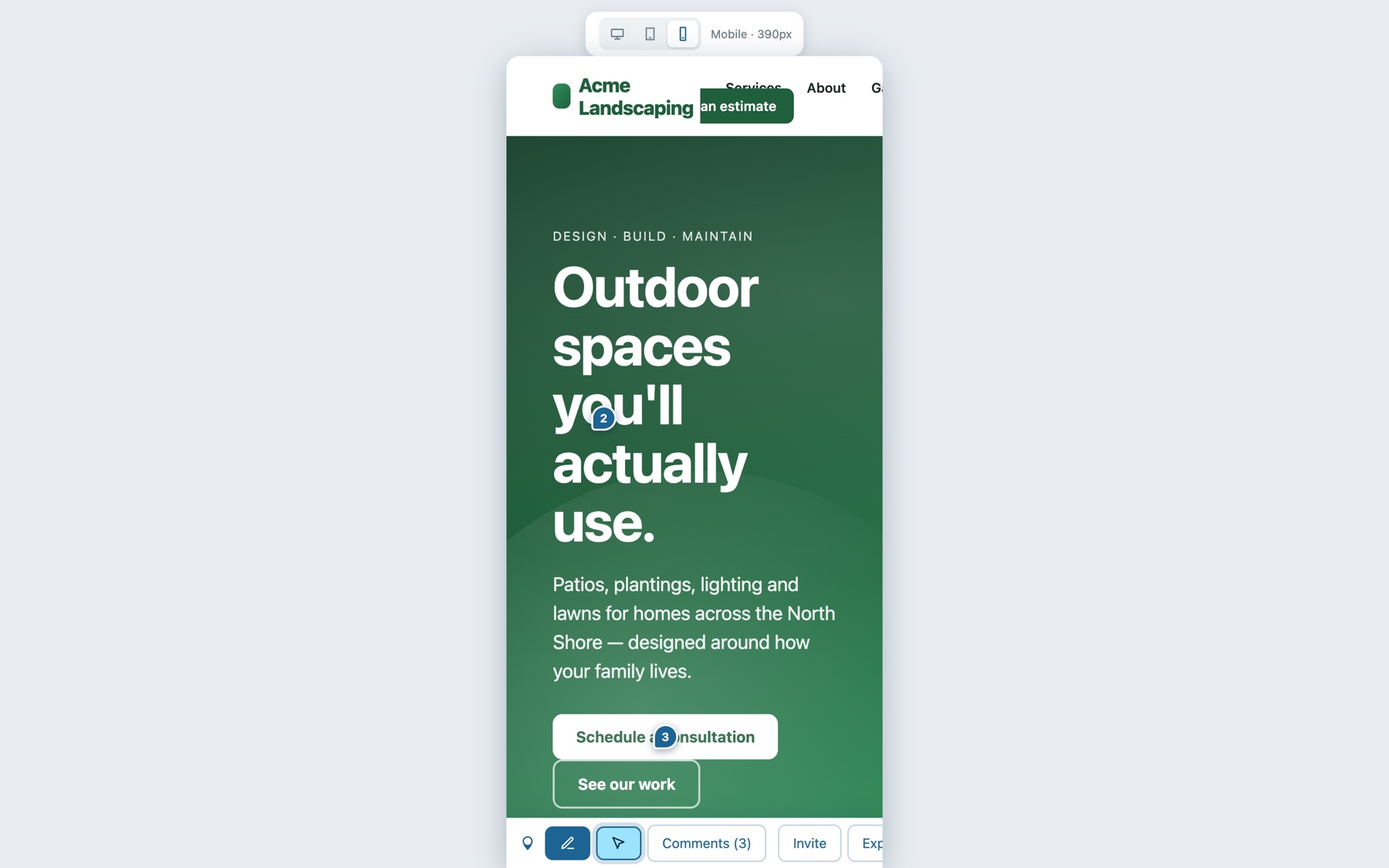
Switch to tablet or mobile from the toolbar and comment inside a real device frame. Every pin remembers the width it was left at: mobile and tablet pins carry a badge, the list filters by device, and clicking a mobile comment from desktop switches you to the mobile view.

The same page previewed in a 390px mobile frame with its pins.

Every site, one place.

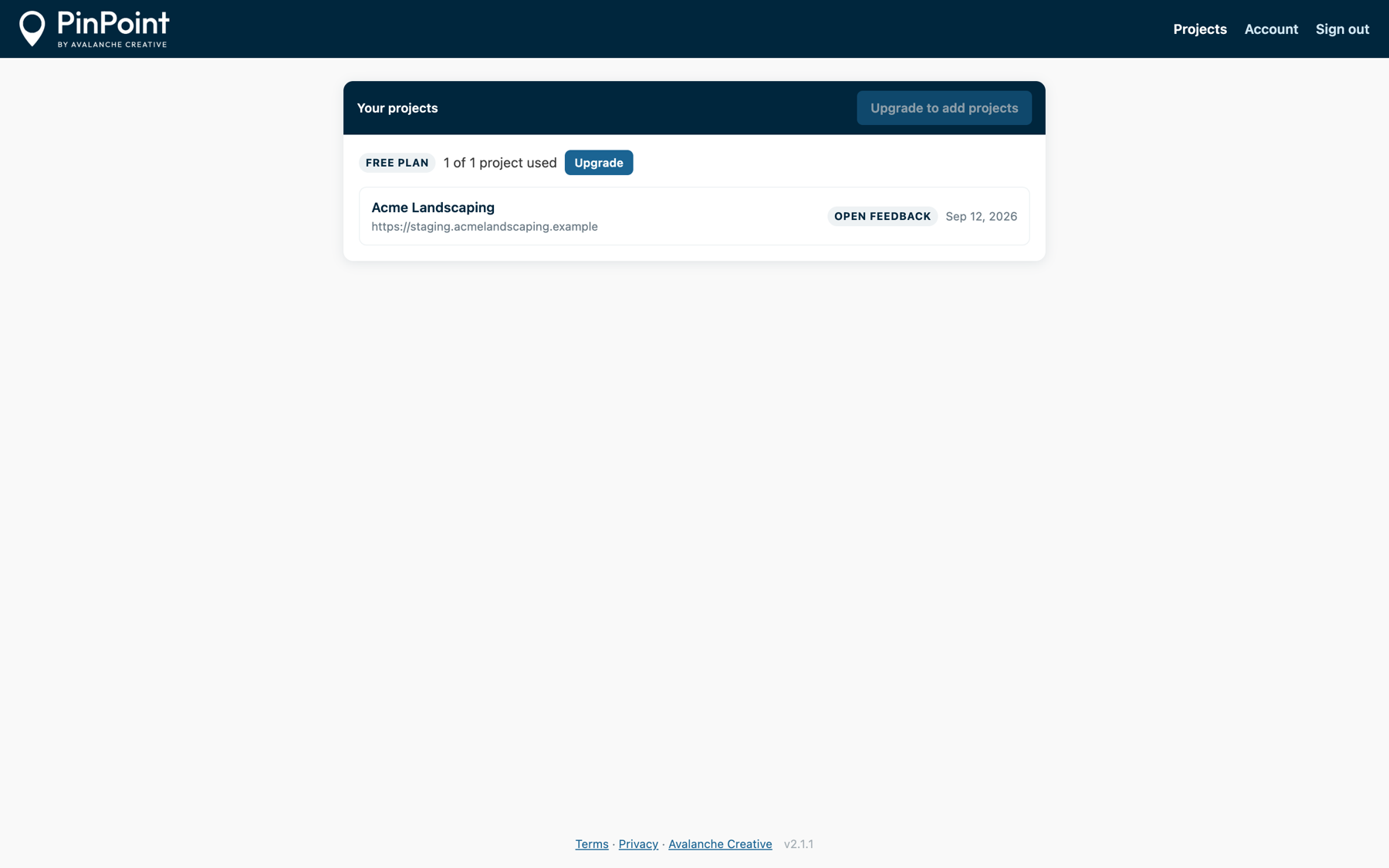
Create projects, grab share links and install snippets, invite collaborators and choose who gets notified. Work the feedback inbox with statuses, assignees, labels, effort and a board per project, and email the client what's waiting on them. You sign in with an emailed code, so there's no password to remember.

The PinPoint feedback inbox: counts for waiting on the client, quick wins and bigger work, then each item with its status, effort, assignee and labels.

For anyone who builds websites for someone else.

Agencies
One link per site for every client review. The Agency plan adds unlimited sites, Slack and ClickUp, and page sign-off so a launch has a paper trail.
Freelancers
Look organized without a project-management stack. The client clicks, you fix it and mark it resolved. One site is free forever.
In-house teams
Marketing, legal and leadership can review staging without logging in. Engineering gets a clean list instead of a Slack thread.

Free for one site. Simple after that.

No per-seat pricing. Reviewers are always free. You pay by the number of sites you review.

Free
$0forever
1 site
50 comments and 10 images per project
Threads, mentions, device previews
Markdown and JSON export
Email notifications
Start free
Pro
$19per month
For freelancers and small teams
10 sites
Unlimited comments and images
Feedback inbox: statuses, labels, effort, board
AI-assistant loop and MCP server
Automatic screenshots and bug context
Get Pro
Agency
$39per month
For agencies running many client sites
Unlimited sites
Everything in Pro
Slack and ClickUp integrations
Page approvals: named sign-off that locks a page
Design rules: style checks, approvals, style guide page
Priority support
Get Agency

Cancel any time. If a paid plan lapses, your oldest projects stay live up to the free allowance and the rest go read-only until you renew. Nothing is deleted.

The short answers.

Do my clients need an account?+
No. With open feedback on, anyone with your link types their name and starts commenting. To control access, invite specific emails and they sign in with a one-time code. There's still no password.
Will visitors see anything on my site?+
Never. The feedback layer only loads for visits that include your private ?pinpoint= link. Everyone else sees your site as usual.
Does it work outside WordPress?+
Yes. The WordPress plugin is the easiest install, but the same one-line script works on Webflow, Squarespace, Shopify, static sites and custom apps.
Will it slow my site down or change how it looks?+
No. The script does nothing unless the PinPoint link is used, and the interface runs in its own isolated layer, so your styles and the tool never collide.
Do I need a design system to use design rules?+
You need your colors, button styles and type sizes written down once. Paste them into the project settings, or import them from a site that serves its rules. Design rules are optional and off until you turn them on for a project.
Where does the feedback live?+
In our hosted backend, isolated per project. Only the owner, invited collaborators and, on open-feedback sites, people with the link can see it. Avalanche staff can access projects for support, as disclosed in our privacy policy.
What happens if I cancel?+
Your oldest project keeps working on the free plan and the rest go read-only. Nothing is deleted, and re-subscribing unfreezes them instantly.
Can my AI coding assistant work the list?+
Yes. Every export includes item IDs, a project key and the exact commands, and PinPoint runs a hosted MCP server so Claude Code can see feedback as tools: list items, triage, reply, set a status, assign. No install, one command to connect. Replies are signed as a person on your team unless you choose to label them as an AI assistant.
What does triage look like?+
Each item can carry labels (bug, copy, design, content needed, photo needed, decision, feature request), an effort size (quick, medium, large) and one of five statuses, including "Waiting on client". The inbox shows the counts up top: what's waiting on the client, quick wins, medium, large, untriaged. Your AI assistant can do the first pass, and the "Needs your decision" email sends the client only the items that are theirs. A one-page review that doesn't need any of this? Each control switches off per project in Settings, and the overlay and inbox get simpler to match.
What is a page approval?+
On the Agency plan, an owner or invited collaborator can approve a page. It records who signed off and when, and turns commenting off on that page until someone reopens it. Replies on existing threads still work.
What counts toward the free plan's 50 comments?+
Every comment and reply on the project. When you reach it the project goes read-only for new comments until you upgrade or delete some. Automatic screenshots count toward the 10-image allowance; you can turn them off per project.
Who makes this?+
Avalanche Creative, a web design and SEO agency in Grand Rapids. We built PinPoint for our own client reviews and use it on every site we ship.

Point, click, done.

Your first site is free, forever. Setup takes about as long as reading this page.

Create your free project
PinPoint by Avalanche Creative © 2026 Avalanche Creative. PinPoint is a trademark of Avalanche Creative.
Setup serviceTermsPrivacyContact